Organising Drawings
It is very important to organise your drawings in a way that they can be managed easily.
Each Drawing (.EFD - Event Floorplan Designer Drawing file) should be saved into its own folder.
The reason for this is because over time, EFD can automatically create PDFs, DWGs, Spreadsheets etc (full list below), so your folder can accumulate a lot of files, see example image below.
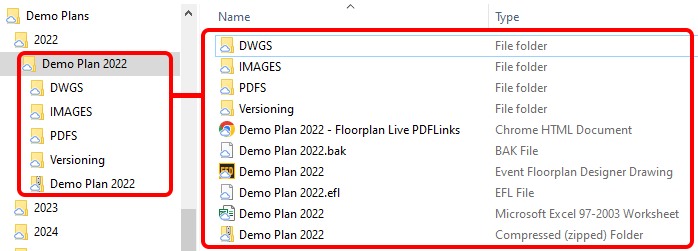
A description of the files you may find in your folder are as follows:
- .EFD - Event Floorplan Designer Drawing - This is your editable master file.
- .EFL - EFL File - This is a lock file which is automatically created to stop the master .EFD file being edited by more than one person, see here for help.
- .BAK - BAK File - This is a backup of your .EFD file, but one version behind. In case your .EFD gets lost or corrupted, copy it, rename the copy from .BAK to .EFD, then open it.
- .XLSX - Microsoft Excel Worksheet - This can be either your exported meterage report or Timelog.
- .PDF - Adobe Acrobat Document - These are usually found in their own subfolder (PDFS) and are exported versions of your floorplan.
- .DWG / DXF - Adobe Acrobat Document - These are usually found in their own subfolder (DWGS) and are exported versions of your floorplan.
- .PNG / JPG / GIF / BMP - Images - These are usually found in their own subfolder (IMAGES) and are exported versions of your floorplan.
- .HTML - HTML Document - This file is created when the Floorplan Live PDF links are exported.
- .ZIP - Compressed (zipped) Folder - This file is created and contains files you have specified to be included from the Views.
NOTE: You usually can't tell from EFD itself that a drawing is corrupted. The main sign is that the .EFD file is tiny (e.g. around 5KB), so check its size in Windows File Explorer. If it is corrupted, try a previous version from the Versioning folder first, as it is usually more up to date. Only as a last resort, use the .BAK file (one version behind): copy it, rename the copy from .BAK to .EFD, then open it.