EFD can keep a symbol upright when the thing it sits inside is rotated. This mainly helps with venue templates: symbols inside the venue stay the right way up when you rotate the venue, so you don't need a separate version of the venue for each rotation.
It only works for a symbol that sits inside another symbol or inside a venue template. A symbol on its own in the drawing will always rotate normally.
Make a symbol stay upright
-
Select the symbol you want to stay upright.
-
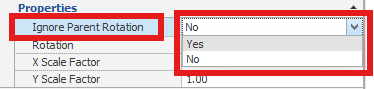
In the Properties Explorer, set Ignore Parent Rotation to Yes.
If you cannot see the Properties Explorer, go to the SETTINGS ribbon and tick Properties. It should appear on the right of your screen.
-
With that symbol selected, create a new symbol from it. You don't need to include anything else. Give the new symbol a different name from the symbol inside it. See Create a Symbol.
-
Insert the new symbol and rotate it. The symbol inside stays upright.