Copying stands using 'Copy and Paste'
This function will allow you to copy and paste stands but with these limitations:
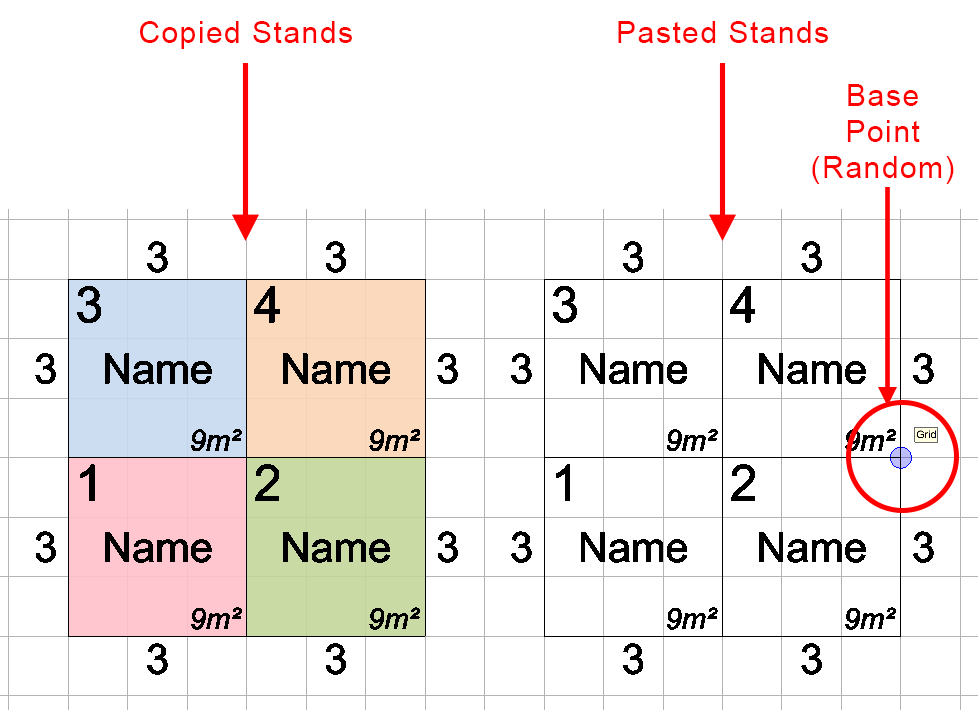
- Dashed and Coloured Stand Outlines are not copied.
- Stand Type colours are not copied.
- The base point is random - The base point is where the stands are placed on the end of your mouse when selecting a position for the copied stands.
The main benefit of this copy method is that it is quick and simple.
There are 2 other copy methods with different options and limitations:
-
First of all, we recommend using the grid when copying stands. See Using the Grid.
-
Select the stand(s) you would like to copy.
Now press 'CTRL + C' on your keyboard to Copy the stands.
Now press 'CTRL + V' on your keyboard to Paste the stands back onto your screen. You will see the stands attached to the end of your mouse ready for positioning.
Select the new position for where you want the copied stands then click your mouse.
NOTE: You can also copy and paste stands from one plan into another. This is the only way to move stands between plans.