Access to the path is denied

If you receive a message similar to the above, it appears when you close your drawing. EFD is trying to create or update the Meterage Report and Exhibitor List spreadsheet, and it cannot write to that file or folder.
The spreadsheet is saved in the same folder as your .EFD file. You can have it created automatically when you close your drawing by going to SETTINGS > Drawing Properties > Save Options, then ticking Export Meterage Report & Exhibitor List to Spreadsheet.
This can happen if:
- the spreadsheet itself is read-only
- the folder the spreadsheet is saved in is read-only
- you opened the EFD file from a read-only location, such as directly from an email attachment in Outlook
- a 2nd copy of the spreadsheet is set to save in another location, and that folder is read-only
How to fix it
First, save the .EFD file to its own folder on your computer, rather than opening it from your email. Each drawing should be saved in its own folder so that automatically created files such as spreadsheets are kept together. See Drawing Organisation.
Then make sure the spreadsheet and that folder are not read-only.
A 2nd copy of the spreadsheet can also be saved in another location. If that folder is read-only, the same message will appear.
To check this, click the Meterage Report button then the Export to Spreadsheet button on the HOME ribbon. In the Export to Spreadsheet dialog, under Do the following when this drawing is closed, look at the Save a 2nd copy of the above files here : field.
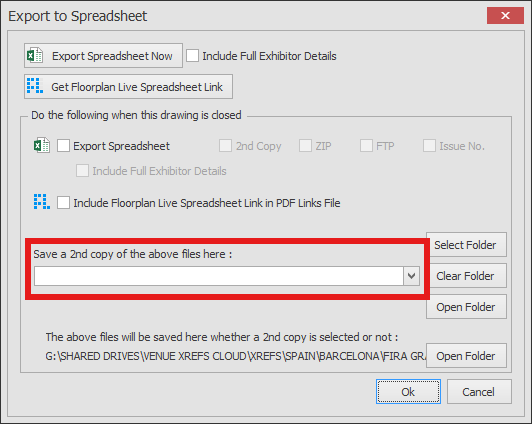
Choose a folder that is not read-only using Select Folder, or click Clear Folder if a 2nd copy is not needed, then close your drawing again.