The 'Align to Grid' function aligns a point you select, to the Grid. For example you can align the corner of a stand to the grid, making it easier for you to move stands around.
Aligning to the Grid
First of all, check that your Grid spacing is setup to how you want. To change your Grid spacing click here.
You can leave the Grid switched ON while using this function, as long as End Point snap is switched on. To switch the Grid ON/OFF, click on the Grid button located in the top right row of icons as shown below. When the Grid is on, the button is highlighted.
TIP: End Point snap is needed so you can pick the corner of the stand accurately. You won't know whether it is on until you try to select an end point, so check it first: End Point is in the Grid and Snap settings. If it isn't ticked, switch it on there.

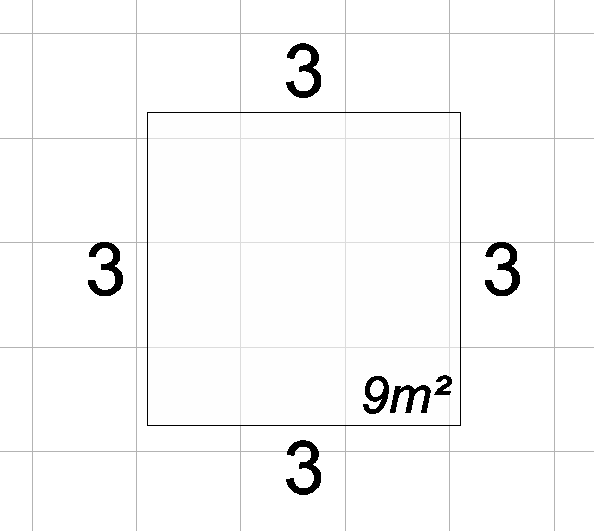
In the sample below you will see that the stand is not on the grid.
-
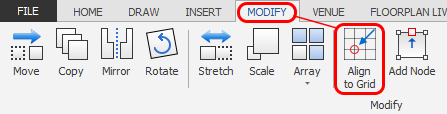
Click on the 'Align to Grid' button which is located on the MODIFY ribbon.
-
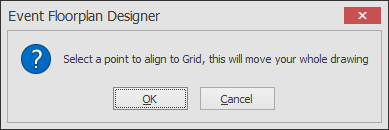
The following message will appear asking you to select a point on your drawing that you would like to align with the Grid. Click OK.
-
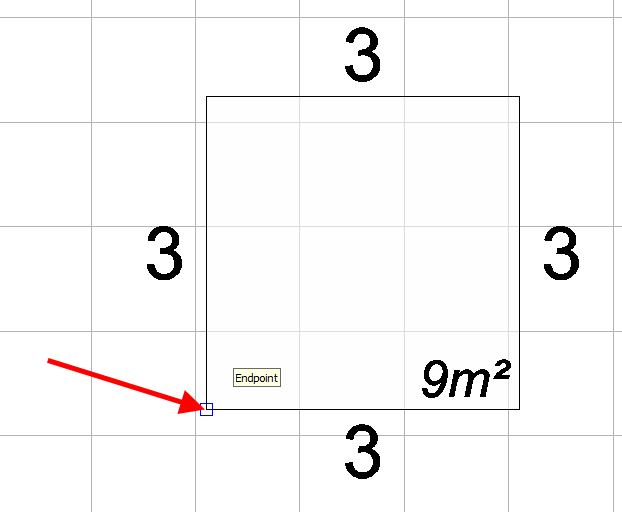
Click on the point you want aligned with the Grid. In this case I want the corner of the stand to be aligned.
Make sure that when you click on this point, an End Point snap marker appears, so you know you are clicking exactly on the corner. If no snap marker appears, switch End Point snap on in the Grid and Snap settings (see the TIP above).
-
After clicking on the point above, your whole plan will now be aligned to the grid based this on this point.
Check against the Grid that it has aligned properly. If the Grid is off, click on the Grid button located in the top right row of icons as shown below to switch it on. When the Grid is on, the button is highlighted.

Troubleshooting
NOTE: If you align using the corner of one stand but the rest of your stands still aren't on the Grid, the most likely cause is that the stands weren't drawn accurately in relation to each other. Align to Grid can't fix this, so please contact us and send us your EFD file and we will sort it out for you.